

Link your iRacing league
Type your iRacing league ID, then link with your verified iRacing ID, or get a code, put it in your iRacing league's About text and press Check.
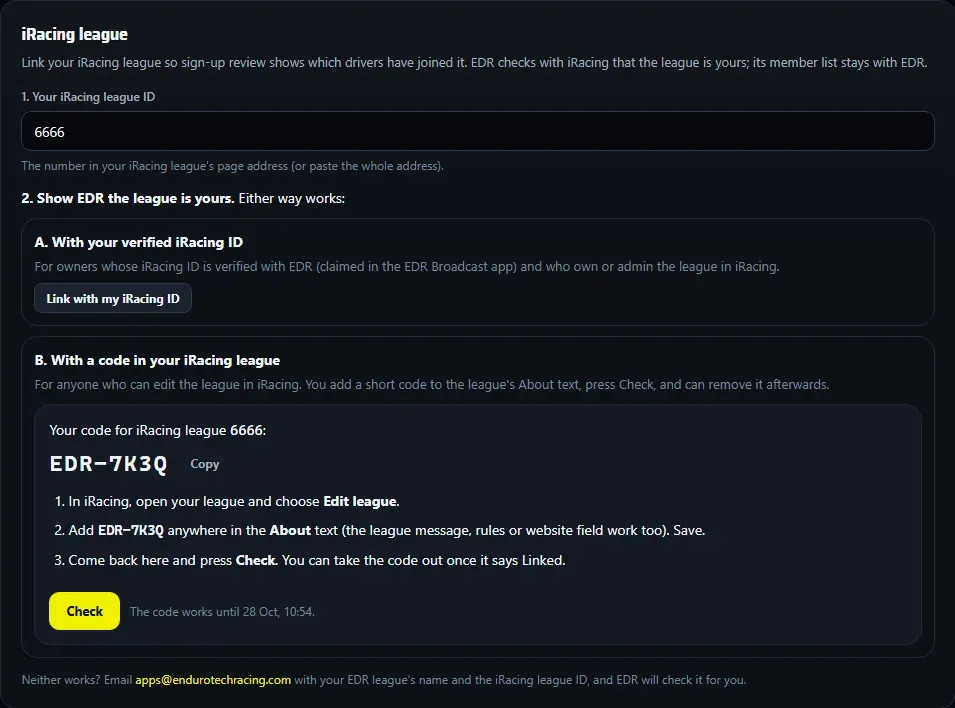
Link your iRacing league and sign-up review shows which drivers have joined it. EDR checks with iRacing that the league is yours, one of two ways.
1. Your iRacing league ID
In the hub, open Settings > iRacing league and type your iRacing league ID: the number in your league’s page address on iRacing. You can paste the whole address. It’s the league’s ID, not your own customer ID.
2. Show EDR the league is yours
A. With your verified iRacing ID
Press Link with my iRacing ID. This works when your iRacing ID is verified with EDR (claimed in the EDR Broadcast app) and you own or admin the league in iRacing.
B. With a code in your iRacing league
For anyone who can edit the league in iRacing:
- Press Get a code. The hub shows a short code such as
EDR-7K3Q, for this league and that league ID, valid for 24 hours. Copy copies it. - In iRacing, open your league and choose Edit league.
- Add the code anywhere in the About text (the league message, rules or website field work too), and save it in iRacing.
- Back in the hub, press Check. EDR reads your iRacing league and links it when the code is there.
- Once it says Linked, you can take the code out of the About text.
If it doesn’t link
- Check says to wait: EDR asked iRacing about your league a moment ago. It says when to check again (about 10 minutes at most).
- The code isn’t found: make sure you saved the league in iRacing, and that the code is in the league’s About text, not its name or a forum post. An old code stops working: Get a new code if it has run out.
- The code shows only that you can edit that iRacing league. It doesn’t verify your own iRacing ID.
- Neither way works? Email apps@endurotechracing.com with your EDR league’s name and the iRacing league ID.
EDR can’t add drivers to your iRacing league for you: iRacing doesn’t allow it, so drivers still join there themselves.