

Set up your league in the league hub
Create the league, then work down the hub's own Get set up list: ten steps from a new league to your first confirmed round. Each step ticks itself when it is done.
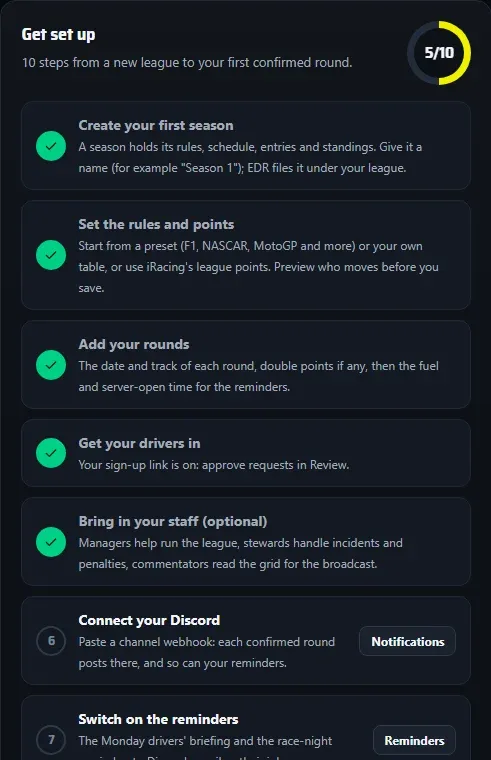
The league hub is where you run your league: seasons, entries, results, standings, your Discord posts and your page on edrbroadcast.com. It lives at my.edrbroadcast.com/league. A league needs a League or Enterprise plan, bought with the same email address you sign in to the hub with.
Create the league
- Sign in at my.edrbroadcast.com/league.
- Type the League name and choose Create league.
- Open Overview. The Get set up list is your map from here: ten steps, in order, and each one ticks itself when it is done.
A league is your series. A season is one championship run of it, for example “2026 Winter”. Name the season for the run, not the league again.
Work down Get set up
| Step | Where | What to do |
|---|---|---|
| Create your first season | Seasons | Give it a name. EDR files it under your league. |
| Set the rules and points | Seasons > Rules | Start from a preset or enter your own table. Preview changes shows who moves before you Save rules. |
| Add your rounds | Seasons > Schedule | Add round for each race: date, track, points and whether bonuses apply. Then set each round’s fuel and Server opens time. |
| Get your drivers in | Settings > Sign-up link, or Add drivers | Share a sign-up link, or load the grid yourself. |
| Bring in your staff (optional) | Team | Invite managers, stewards and commentators. |
| Connect your Discord | Settings > Notifications | Paste a channel webhook. See Discord posts. |
| Switch on the reminders | Seasons > Schedule > Reminders | The Monday drivers’ briefing and the race-night reminder. |
| Go public | Settings, and Standings | Your public page and Find a league. |
| Link the EDR Broadcast app | In the app | Settings > League profiles, pick this league, then tick Official standings from this season on the championship. |
| Confirm results after each round | Seasons > Results | Import and confirm each round. |
Have the rules and the schedule in place before you confirm the first result: the standings are worked out from them.
Good to know
- Running more than one class? Choose Classes and cups on the season and add them before drivers sign up or you paste entries.
- Times are in the season’s time zone. EDR takes it from your browser when you create the season; it shows above the rounds with Change beside it.
- Starting again? Don’t delete a season you have set up. At the end of a season choose Close season, then New season from this one: it copies the rules, classes, reminders and sign-up settings, and Copy the entries brings the same cars over.
- Stuck? The hub’s own Guide covers every job in more detail, and you can email apps@endurotechracing.com.