

Load your grid without sign-ups
No profiles or sign-up forms needed: set up your classes, paste one line per driver, and the hub builds the grid. Shared numbers become one car.
You can put every driver into a season yourself. Nobody has to make a profile or fill in a sign-up form. All you need is each driver’s iRacing customer ID.
How it fits together
- Drivers is your league roster: names, teams, car numbers and countries.
- Seasons > your season > Entries is the grid for that season. Each entry is one car with 1 to 4 drivers.
- Everything is matched by iRacing customer ID, never by name. If a driver makes a profile later and claims their ID, they link to their entry automatically.
The fast way
1. Set up your classes
Seasons > your season > Classes and cups. Create every class first: an entry can only pick a class that already exists. One class? Skip this.
2. Load the roster (optional)
Paste entries (step 3) fills in names too, so you can skip this. Use it when you also want emails, countries or invites.
- Drivers > Add drivers > Paste or upload a list. Paste from your spreadsheet, or drop in a CSV. The Template button beside the drop zone downloads the layout.
- Columns:
iRacing ID, name, email, team, number, country. Only the iRacing ID is needed, and a header row is fine. Countries take two or three letters (NZ or NZL). - Untick the invites if you don’t want drivers emailed.
3. Put them on the grid
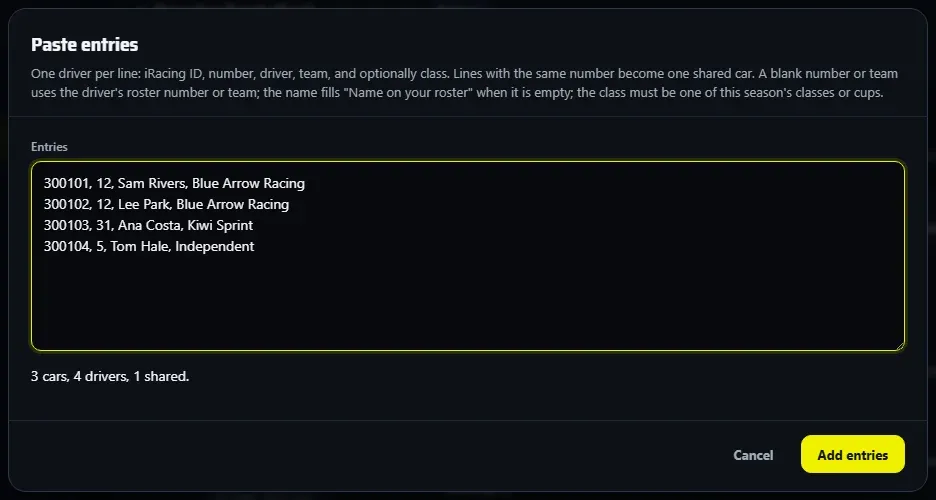
Seasons > your season > Entries > Paste entries. One driver per line:
iRacing ID, number, driver, team, class
123456, 7, Sam Smith, Team Red, GT3
234567, 7, Alex Jones, Team Red, GT3
345678, 22, Pat Lee, Blue Racing, GT4- Drivers who share a number become one car, up to 4 drivers.
- Class is optional and matched by name. A class the season doesn’t have keeps that car out, with a message saying so.
- A blank number or team uses the driver’s roster number or team.
- The driver name fills Name on your roster when the roster has none yet. It never overwrites one. That name is what shows on air and on your public pages.
- The box counts what it read (for example “3 cars, 4 drivers, 1 shared”) before you choose Add entries, and the hub reports any car it couldn’t add.
4. Check the grid
Look over Entries and press Edit on any car you want to change. Add entry adds one more car.
5. Catch anyone you missed at results time
When you import a result, anyone not in the season shows as Not matched: choose Add as entry, Guest, Ignore this time or Always ignore.
Good to know
- Teams: the team on each line becomes the car’s team. Spell a team the same way every time, or you get two teams. Team standings are set in Rules > Teams.
- A new season can bring the same cars over: tick Copy the entries in New season from this one.
- The roster holds up to 150 drivers per league.
- EDR can’t add drivers to your iRacing league. iRacing doesn’t allow it, so drivers still join there the usual way.
- Only the owner and managers can add entries, and only while the season is open.