

Download EDR Broadcast
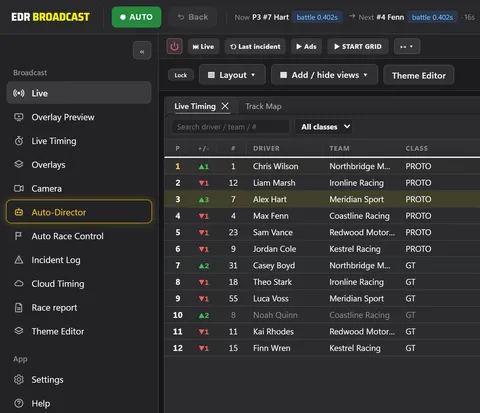
The Windows app for iRacing broadcasts: overlays, Auto-Director and replay in one screen, sent into OBS or vMix. Version 1.0.
Start on the Free plan. Every new install can try Pro for 14 days from inside the app: no card, and no automatic charge when it ends.
What you need.
EDR Broadcast runs on Windows and reads iRacing. There is no Mac version and no support for other sims.
- A Windows PCInstall EDR Broadcast on the Windows machine that runs iRacing and your broadcast.
- iRacingJoin a session so live timing and driver data can fill the overlays. No session yet? Start the app in mock mode to lay out your scenes.
- OBS or vMixEvery overlay is a transparent browser source with its own URL, so it drops into the scene you already have.
Five steps to air.
Lights out in five minutes. The full walkthrough is in the getting started guide.
- Step 1: DownloadDownload EDR Broadcast for Windows from this site. The Free plan needs no card.
- Step 2: InstallRun the installer on the Windows PC that runs iRacing, then open the app. Join a session in iRacing and the app detects it.
- Step 3: Add the browser source in OBS or vMixIn the app, open Settings, then OBS Browser Sources, and copy the Program URL. Add it to your scene as a browser source at 1920 x 1080.
- Step 4: Pick a theme and overlaysChoose a theme in Settings, then Themes, and switch on the overlays you want in the Overlays section.
- Step 5: Go liveCheck the Overlay Preview, then go live. Direct the cameras yourself, hand them to the Auto-Director on Pro, or mix both.
Before you go live
If Windows asks first
Microsoft Defender SmartScreen can ask you to confirm before the installer runs. Only continue when the installer came from this page.
Updates
When a new version is ready, the app downloads it in the background and offers Restart and install. It never interrupts a sim session.
Before you go live
Run a practice session, check every scene and keep a clean fallback scene ready. Read the known issues, or ask in Discord.
Run your own show.
Free stays free. Pro is A$19.95 a month and League A$45 a month, when you need them.