

Post results to Discord, and publish official results
Paste a Discord webhook, switch on Post on confirm, and choose when rounds post: on confirm, after some hours, or only when you press Publish official results.
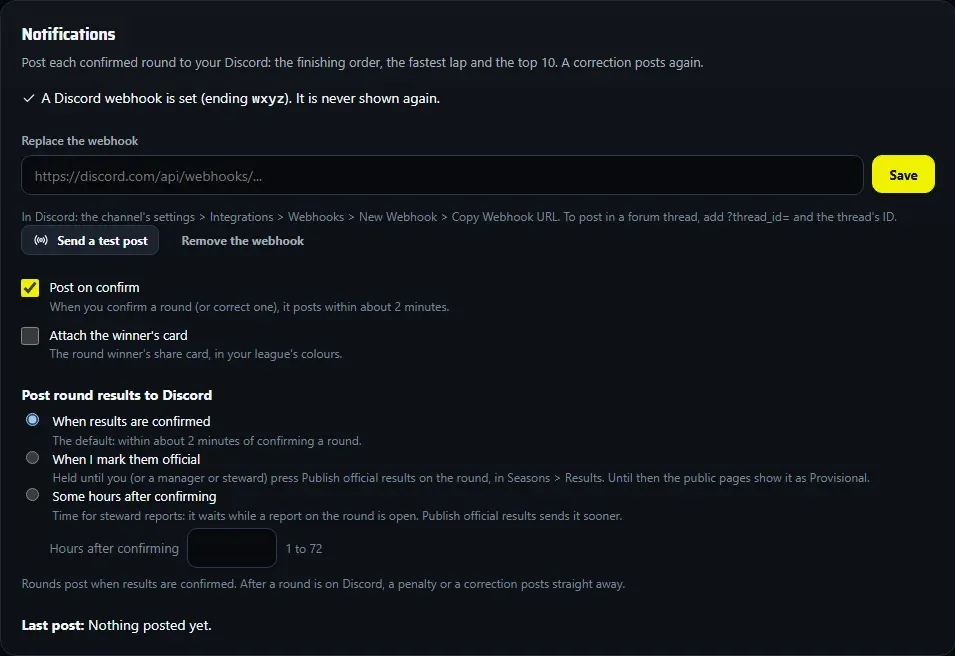
Each round you confirm can post to your Discord: the finishing order, the fastest lap and the top 10, with a link to your standings.
Connect your Discord
- In Discord, open the channel’s settings > Integrations > Webhooks, create a webhook and copy its URL.
- In the hub, open Settings > Notifications, paste it and press Save. Only its last four characters are shown afterwards.
- Press Send a test post and check it lands in the channel.
- Tick Post on confirm. Optionally tick Attach the winner’s card, in your league’s colours.
Practising? Use a webhook for a test channel, not your league’s main one.
Choose when rounds post
Under Post round results to Discord:
| Choice | When the round posts |
|---|---|
| When results are confirmed | The default: within about 2 minutes of confirming. |
| When I mark them official | Held until you (or a manager or steward) press Publish official results on the round. |
| Some hours after confirming | Type 1 to 72 under Hours after confirming. It also waits while a steward report on the round is open. |
Until a round is published, your public pages show it as Provisional.
Publish official results
With When I mark them official:
- Confirm the round as usual. In Seasons > Results, under Official results, it shows as provisional and not posted.
- When your stewards are done, press Publish official results on the round (on the confirmed result, or in Review > Official results to publish).
- It posts within about 2 minutes and the public pages drop Provisional.
The most common mistake: choosing When I mark them official and never pressing Publish official results. Nothing posts until someone does.
Corrections and deletions
- A penalty or a correction after a round is on Discord posts straight away, whatever you chose. The round’s status shows Correction posted with its time.
- Deleting a confirmed result that was on Discord posts Results withdrawn, and the round has to be published again.
- Drivers on your Always ignore list are never in the post.