

Join a league with its sign-up link
Open the league's sign-up link (or find one at edrbroadcast.com/leagues/find), pick up to three car numbers, answer its questions, then Check and send.
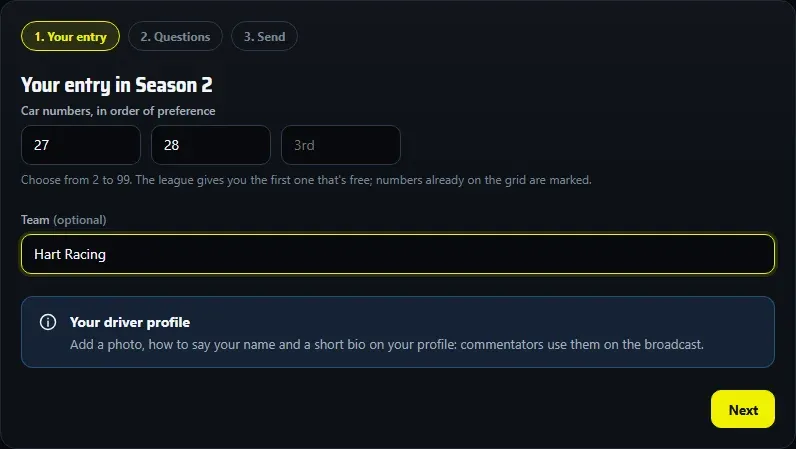
Leagues that run in the EDR league hub take sign-ups with a link. The league gets your request, with your iRacing details, and approves you.
Find a league
Your league will usually share its sign-up link on its Discord or website. To look for one, open Find a league: each listed league has Sign up, its League page and Standings.
Sign up
- Open the link. The page says Taking sign-ups, or that the grid is full (you join the waitlist) or that sign-ups are closed.
- Create your account or Sign in to sign up. With a new account, check your inbox and click the confirmation link: it brings you back to carry on.
- The first time, confirm the licence agreement and your age, and Claim your iRacing customer ID (see your driver profile).
- Your entry: if the league runs more than one season, pick it under Which season?. Type up to three car numbers, in order of preference. A number already on the grid is marked Already taken. Add your team, or leave it blank to race as an independent.
- Questions: answer the league’s own questions. Report these questions if anything looks wrong: a league never needs your password.
- If the league needs more on your profile (a nationality, a photo, a published profile), the page asks for it in place, and the send button says what’s missing.
- Check and send, then Send request. You’ll see Request sent.
After you send
- Before a decision, you can change your request (Save changes keeps your place in the queue) or Withdraw it.
- Approved: the page says You’re in, with the league’s Next steps. You get an email too, unless you’ve turned off Emails about my leagues.
- On your driver profile, the league’s card shows the next round, Show the standings and Ask a question.
- You still join the league on iRacing as usual. EDR can’t add you there.
Good to know
- A full grid puts you on the waitlist, in order. The league calls drivers up when a seat opens.
- Your car number on screen comes from the session, not from your request.