

What is an auto-director in iRacing broadcasting?
How automatic camera direction covers an iRacing race, when to take the cameras yourself, and how it pairs with incidents and replays.
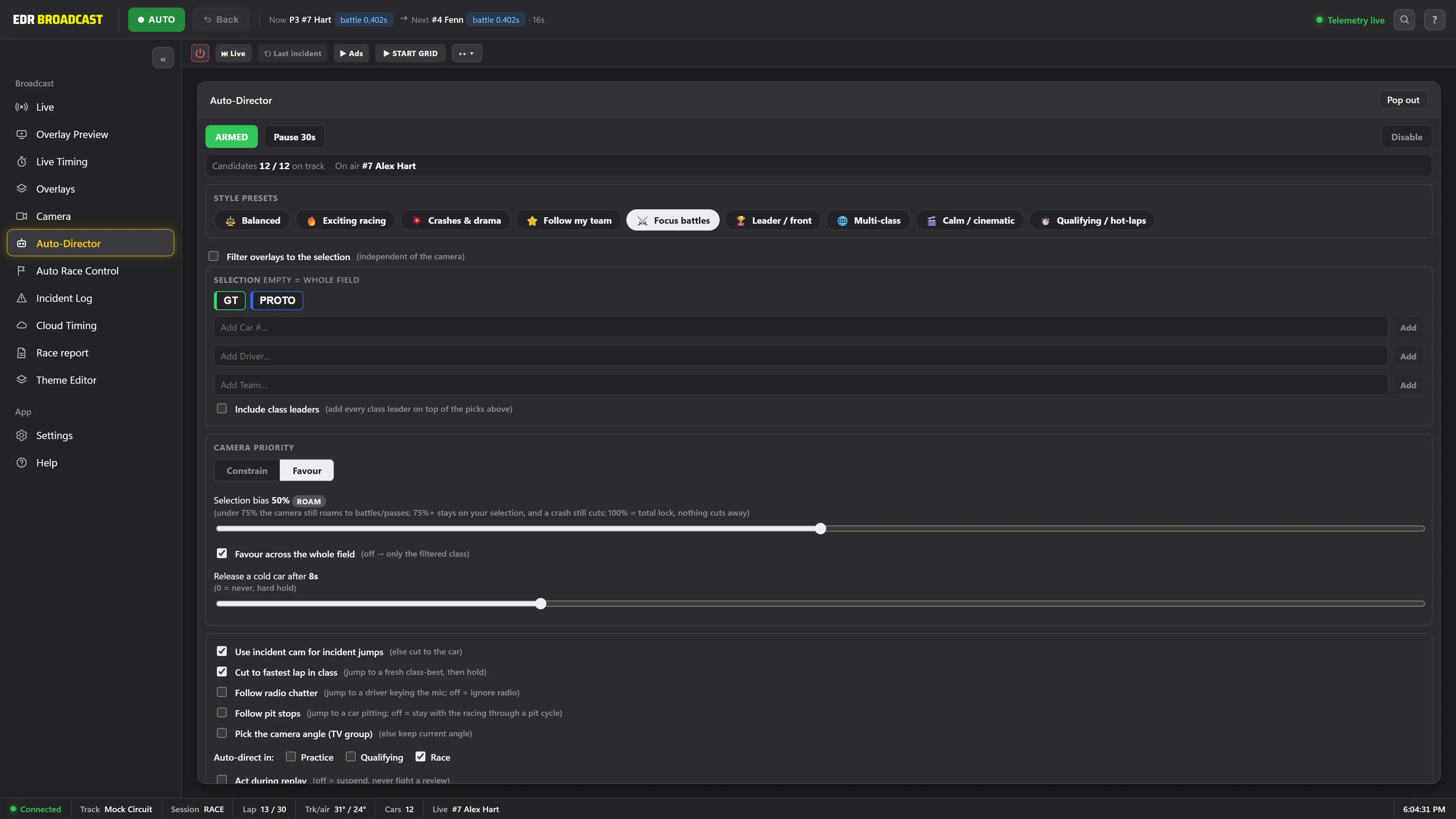
An auto-director is software that chooses broadcast cameras for you during an iRacing race. It watches the whole field, cuts to battles and cars in trouble, adjusts its behaviour under caution, and tightens onto the decisive fights in the closing laps. iRacing includes native Director Mode; this guide explains what a broadcast-focused layer adds (battle scoring, race-state behaviour, shot pacing, anti-repetition and immediate manual override) and when you should still take the cameras yourself.
The problem with manual camera direction
Every sim racing broadcaster hits the same wall: the graphics update themselves, the commentary flows, but someone still has to sit on the camera switcher for the whole race. An iRacing auto-director exists to take that job off a human, without making the show look robotic.
Directing an iRacing broadcast by hand means scanning the relative gaps of 40 or 60 cars, judging which battle matters most, cutting to it, and doing that again every few seconds. In a one hour sprint it is intense. In a 6, 12 or 24 hour endurance race it is unsustainable: attention fades, the same two cars end up on screen for laps at a time, and the race-changing moment happens off camera.
Most leagues solve this with people. A camera operator, a producer, sometimes a spotter feeding them information. That works, until the crew is not available, the race runs overnight, or the league simply does not have three people free every single round.
How an auto-director decides what to show
A basic camera rotator just cycles through cars on a timer. An auto-director reads the race. The Auto-Director in EDR Broadcast makes its cuts on a handful of principles:
Let battles breathe. It holds on a proper fight instead of cutting away every few seconds, closer to how a human director covers a race.
Spread the coverage. Anti-repetition logic moves the shots around the field so the same two cars do not get every camera.
Read the race state. It cuts differently under yellow, on pace laps and at restarts than it does under green.
Tighten at the finish. A closing-laps mode narrows onto the most important battles as the race comes to an end.
Follow your priorities. You can favour or lock onto a driver, class or team, then tune which cameras it uses and how long it dwells in each situation.
Stay on a leash. One arm and disarm switch hands the wheel to the director or takes it back instantly.
What should the director do here?
The leader is alone and P8 is closing rapidly on P7
Move to the battle before the pass develops, unless a finish, caution or championship event makes the leader more important.
A possible incident happens off camera
Log it without abandoning a live lead battle. Show the replay in the next safe window.
The producer selects a specific car
Respect the manual lock until the producer releases it. Automation should never fight the operator.
Manual operator vs auto-director
Neither approach wins every situation. Here is how they compare across a typical race night.
| Situation | Manual operator | Auto-Director |
|---|---|---|
| Lead battle mid-race | Strong, if the operator spots it forming | Strong, gap data means it sees the battle building before it arrives |
| Hour 14 of a 24 hour race | Fatigue sets in, coverage narrows | The same decision rules at 3am as at 3pm |
| Caution and restart | Good, with experience | Caution-aware cutting built in |
| Championship storyline | Strongest here, humans know the narrative | Needs to be told: bias a driver, class or team and it follows |
| Cost per race night | One or more crew members, every round | Included in EDR Broadcast Pro |
When you should still take the cameras yourself
An auto-director removes the routine cutting. It does not know that the driver in P8 announced their retirement this week, or that your sponsor wants a shot of their liveried car on the pit straight. Those are human calls, and the workflow is built for them: take a camera whenever you want the shot, then hand control back with the master switch.
Treat it like cruise control. The software handles the constant, repetitive decisions and the producer steps in for the moments that need judgement. If you are still setting up the rest of your show, start with the guide on how to broadcast an iRacing race with OBS.
Director’s note. A good director, human or software, holds a shot longer than you expect. Constant cutting looks busy. Patience reads as professional.
Setting up the Auto-Director in EDR Broadcast
The Auto-Director is a Pro feature. You can run it on a real race night with the 14-day Pro trial, started inside the app with no card; when the trial ends you return to Free unless you choose a plan. See pricing for plan details.
Setup is short:
- Pick any drivers, classes or teams you want the coverage to favour.
- Tune the cameras and dwell time for each situation if the defaults do not suit your series.
- Arm the director before the green flag.
On the League plan, remote browser control lets your crew work from a browser away from the broadcast PC.
Pair it with incident detection and the replay transport and the production loop closes: the director covers the field, the incident log tells you what it found, and the replay jumps straight to the moment. That side is covered in how to find and replay incidents in an iRacing broadcast.
Frequently asked questions
What does an auto-director do in an iRacing broadcast?
It selects broadcast cameras automatically. It watches the whole field, cuts to battles, incidents and restarts, and tightens onto the key fights in the closing laps, so the show can run without a dedicated camera operator.
Can I override the auto-director mid-race?
Yes. You can take a camera yourself whenever you want the shot, and a single arm and disarm switch hands control to the director or takes it back instantly.
Does it work under cautions and restarts?
Yes. The director reads the race state and changes how it cuts under yellow flags, on pace laps and at restarts.
Can it focus on a specific driver, class or team?
Yes. You can favour or lock onto a driver, class or team, and tune the cameras and dwell time the director uses in each situation.
Does the auto-director need an internet connection?
The Auto-Director works from the iRacing session data on the host PC. An internet outage can still interrupt the iRacing session itself, streaming and remote control, so do not assume the timing or camera targets remain current. Use a standby scene and check the session after reconnecting.